
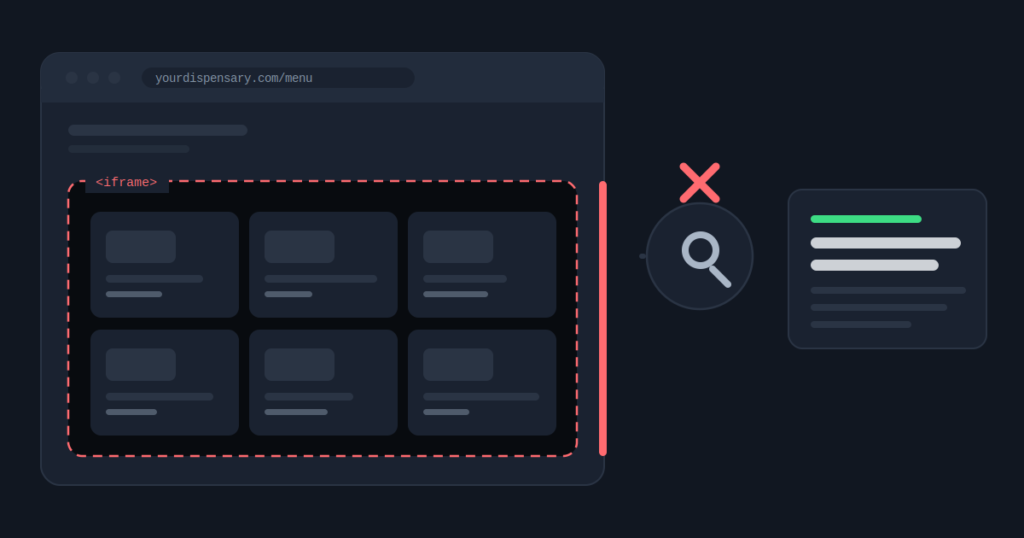
There is a signature to this problem, and once you have seen it you cannot unsee it.
Open Search Console, go to the performance report, and sort your queries by clicks. Look at the top twenty.
If they are all your business name, your name plus a city, and a few near misses on your own brand, then look for what is absent. No product. No strain. No brand you stock.
That means your menu is not in the index. You do not have a ranking problem. You have a visibility problem, and no amount of content will fix it.
That query report is the fastest diagnosis in cannabis SEO. Two minutes, and it tells you whether the next six months of budget should go on writing or on plumbing.
Why This Happens, And Why It Is Not The Platform’s Fault
Almost every dispensary runs its menu through a third party. That is a sensible decision. Building compliant inventory software with live stock, state traceability reporting, and age verification is not a reasonable use of a retailer’s money.
The problem is not Dutchie, or Jane, or Meadow, or Tymber. It is which integration somebody chose, usually years ago, usually during a rush to open.
The default embed on most platforms drops your menu into the page inside an iframe. An iframe is a window onto a different website, and everything inside it belongs to the domain that served it. Your page contains the window. It does not contain the products.
Here is the part most operators miss. This is not a bug anyone is going to fix. It is how iframes have always worked and how they are supposed to work. The content is being credited correctly. It is simply being credited to somebody else.
What Dutchie Itself Says About This
You do not have to take my word for any of it. Dutchie publishes its own SEO documentation, and it is unusually direct.
The standard embedded menu, it says, will be “partially indexed by Google”. That word is doing a lot of work. Partially indexed is not a synonym for indexed, and the gap between them is every product search in your market.
Dutchie sells more than one way to put a menu on a website, and they do not behave alike in search. Most operators are running the first one without ever having been shown the others.
Dutchie is the example here because it is the platform I am asked about most. The ladder is the same on Jane, Tymber, Meadow and the rest. There is a default embed that is quick to install, and there is a better option further up that somebody has to ask for.
Product names move around. Check what your contract actually includes before you assume you are stuck.
The Half-Truth That Keeps This Problem Alive
Somebody will tell you Google renders JavaScript now, so a JavaScript menu is fine.
That is true, and it is not the whole story, and the gap between those two things has cost dispensaries a great deal of money.
Google indexes in two passes. The first reads your HTML immediately. The second renders JavaScript and comes back later, from a queue, on a schedule nobody outside Google can see.
For a high authority news site that second pass might arrive in minutes. For a regional dispensary with a modest crawl budget it can be days, and it is not guaranteed to complete.
So a JavaScript menu is better than an iframe, because at least the content could eventually belong to you. But “could eventually” is a poor foundation for the page carrying your entire catalog. Stock rotates weekly, and the second pass may arrive after the product has sold out.
An iframe menu is never yours. A JavaScript menu is yours on a delay. A server rendered menu is yours immediately. That is the real hierarchy, and most conversations collapse it into “JavaScript is fine now”, which is exactly how the problem survives.
What It Looks Like On A Real Account
On a fifty store chain, the menu had been embedded the same way on every location page for three years. Search Console showed the pages indexed, and the marketing team reasonably took that as confirmation everything was working.
Not one product name and not one brand they carried appeared in the rendered HTML.
The fix was scoped inside a week. The three years of product and brand searches that went elsewhere were not recoverable.
The detail worth sitting with is that nobody had been careless. The pages were indexed, the site was fast, the design was good, and the agency reports were full of green.
Indexed means Google has your URL. It says nothing about whether Google has your content, and no standard report separates the two. That single ambiguity wastes more cannabis marketing spend than any other technical issue I meet.
The Commercial Problem Underneath The Technical One
There is a second cost here that rarely gets named.
When your products live on your menu provider’s domain, the search value they generate accrues to your menu provider. You pay a monthly fee for the software, then pay again in visibility that lands on somebody else’s asset.
Worth raising when your contract renews, and worth asking before you sign a new one. Put one question to any menu vendor: does your integration place product content in my page’s HTML, on my domain, and can you show me a customer whose product pages rank?
Most sales conversations never reach that question. So most integrations default to the version that is easiest to install rather than the version that is best for you.
How To Check It Yourself
Do not take a tool’s word for it, including mine. Three checks, in the order I run them.
View source, not Inspect Element. This is the ten second version and the one I use most. View source rather than Inspect Element, then search the page for a product you stock and a brand you carry. Inspect shows the live DOM after every script has run, which is why it always looks fine, and why it has misled so many teams. View source shows the HTML as delivered. Products in Inspect but not in view source is the whole problem in one screen.
URL Inspection, Live Test. In Search Console, run URL Inspection on a menu page and choose Live Test. Open the rendered HTML and search it the same way. If the products appear only inside an <iframe> tag pointing at another domain, you have your answer.
Filter the Pages report for your menu URLs. Dutchie menu URLs carry a recognisable string, dtche, and Dutchie’s own documentation suggests filtering Search Console for it. Other platforms have their own marker. What you are looking for is whether any menu URL is indexed at all, and whose domain it sits on when it is.
One trap in that last check. If your menu is hosted by the provider, its sitemap sits on the provider’s domain too, so it cannot be submitted in Search Console the normal way. It has to be referenced from your robots.txt instead. Plenty of hosted menus are invisible for that reason alone, and nobody notices because the setting was never mentioned.
Check it in about twenty seconds
The menu visibility checker detects which platform you run and works out whether the embed is an iframe or JavaScript. Then it counts how many product terms, brand names, and prices survive into the HTML Google reads.
Open the menu visibility checker
How To Fix It
Three options, cheapest first. Be honest about which one your team will actually ship, because a plan nobody executes is worth less than a smaller plan somebody does.
1. Build real content around the embed. Category descriptions, brand explainers, and buying guidance written into the page HTML. This does not make your menu visible and it is not a fix. What it does is stop the page being thin, which removes the immediate penalty risk while you work on the real solution.
2. Ask your provider to move you up the ladder. Most platforms now sell a crawlable hosted menu with its own product URLs. On Dutchie that is a different product from the default embed, not a setting inside it. Ask what your plan includes and what the upgrade costs. A surprising number of operators have never asked, and some are already paying for the better version without it being switched on.
3. Render the menu through their API. Pull product data server side and render it into your own pages. This is the version that wins product and brand searches, because the content is yours, it is always in the HTML, and it sits on your domain.
One thing to expect after option two or three. The moment your menu becomes crawlable, every filter and sort combination becomes a URL, and a crawler will find all of them. That is a good problem to have, and still a real one. What filter URLs do to a crawl budget is worth reading before the rebuild rather than after it.
Options two and three also change your menu URLs. Our guide to dispensary menu migration shows how to map and redirect them, so the upgrade does not cost the rankings you already have.
Why This Hits Chains Harder Than Single Stores
One thin page is a missed opportunity. Forty of them, one per store, built from the same template, is the pattern that precedes a scaled content manual action.
That is how a menu integration decision made in year one quietly becomes a penalty in year three.
And a manual action does not remove the page that triggered it. It removes everything matching the pattern, which means every location you operate, on the same day, with no warning and no staggered recovery.
Do not commission a content program before fixing delivery.
Writing more pages onto a foundation Google can only half read is how agencies burn a quarter of budget with nothing to show for it. If the fix turns out to be a rebuild rather than a setting, that is what our cannabis technical SEO work covers. It is the most common sequencing mistake in this industry, largely because content is easy to sell and menu rendering is not.
One Note On Subdomains
Some operators are told to put the menu on a subdomain, like menu.yourdispensary.com. Dutchie offers this, and its own documentation is honest about the catch: a subdomain menu gets indexed, but Google treats subdomains as separate sites.
So it works, and it is a real improvement on an iframe, but the authority it earns builds up next to yours rather than inside it.
If you go that route: include it in your sitemap, point real internal links at it, and check that the canonical tags on both sides are not contradicting each other. Done carelessly it either outranks your own brand pages or it never ranks at all.
Menu delivery is the technical problem we see most often in dispensary search optimization, so it is the first thing we check on any new site.
If you take one thing away
Fix how the content is delivered before you invest in writing more of it.