
Open Google and search site: followed by your own domain.
If your site has forty pages and that search returns three, you do not have a content problem or a link problem. Something is stopping the crawler at the door. On a cannabis site, it is nearly always the age gate.
This is the second most costly technical fault I find on dispensary websites, after invisible menus. It is also the one owners feel worst about, because the gate was built out of caution. Somebody was trying to do the right thing.
The Mechanic Almost Nobody Explains
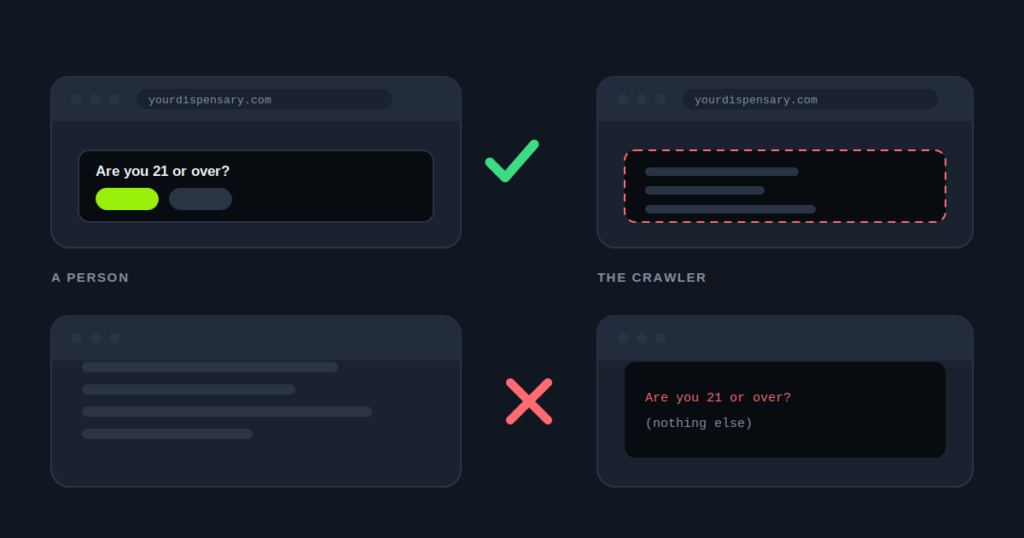
Googlebot does not keep cookies. It does not hold a session, it does not remember a past visit, and it carries nothing from one page load to the next.
This is not a guess. Google’s own JavaScript documentation says its rendering service “does not retain state across page loads”. Cookies, local storage and session storage are all cleared.
So every crawl is a first visit. Every single time.
For a customer, an age gate is a one-time interruption. They confirm, a cookie is set, and they never see it again. That is why nobody on your team has spotted a problem. They confirmed their age a year and a half ago, and the gate has been invisible to them since.
For a crawler, the same gate can be a permanent wall. It arrives with no cookie, gets stopped, stores nothing, and arrives with no cookie again tomorrow.
That one fact explains most of what goes wrong here. If your gate uses a cookie or a session to decide what to send, the crawler is stuck at visit one for good.
What Google’s Own Guidance Says About Age Gates
Google has a page on this, and most dispensary teams have never read it. It sits in the documentation on interstitials and dialogs, under a heading for mandatory interstitials. Google even uses an age gate as its example.
Three points in it matter for you.
Legally required gates are treated differently. Google’s usual warning about intrusive pop-ups does not apply in the same way to an interstitial you must show by law.
Overlay the content, do not redirect. Google asks that the gate sit on top of the content, so it can still index the page. It also warns against redirecting every request to one page, because that removes all but that one page from search results.
For adult age gates, let Googlebot through. Google recommends allowing Googlebot to crawl the content without triggering the gate, after verifying that the request really comes from Googlebot.
That last point needs saying plainly, because a lot of SEO advice says the opposite. An earlier version of this post called any exception for Googlebot cloaking. Google’s current guidance does not agree, and the post has been corrected.
The Three Builds, And What Each One Costs
A server side redirect sends every request to /age-check/ until the visitor confirms. This is the most damaging version, and the exact thing Google warns against. Google finds forty pages, gets sent to the same place forty times, and decides you have one page.
A cookie wall returns a normal 200 response but holds the content back until the cookie exists. It is less obviously broken, and in some ways worse, because everything looks healthy from outside. Search Console starts reporting soft 404s. That is Google’s way of saying the page loaded and held nothing.
A client side overlay loads the full page, then paints the gate on top. The server does not care who is asking, so the crawler and the customer get the same HTML. The age gate is one of several faults in the delivery layer, and the others are worth ruling out in the same sitting.
What your state requires is a separate question from how the gate is built. The rules I have read ask for an age check before someone views the content. I have not seen one that demands the check run on the server. Rules differ and they change, so check your state’s rules and confirm with your compliance counsel. None of this is legal advice.
Where The Cloaking Line Actually Sits
Google defines cloaking as showing users and search engines different content, with the intent to manipulate rankings and mislead users.
The same policy has a note on gated content. A paywall or content gate is not cloaking if Google sees the full content, just as a person with access would. For an age gate, that person is a confirmed adult customer.
So the line is not “any exception for Googlebot”. The line is a different page for Googlebot. Three things cross it.
Content only the crawler sees. Extra text, extra keywords, or products a confirmed customer would never find. That is the classic case in Google’s policy.
An exception keyed on the user agent string. Anyone can send a request that claims to be Googlebot. Scrapers do it all the time. Google’s advice is to verify the request, by a reverse DNS lookup or against Google’s published IP ranges, not to trust the label.
A crawler version that drifts. Some bypasses serve a cached copy that stops matching the live page. Months later, Google is reading a menu and prices your customers no longer see.
Never trust the user agent string on its own.
If you build an exception, verify every request. If you would rather not maintain one at all, use the overlay and there is nothing to verify.
Which Option To Choose
For almost every dispensary site, the overlay is the better choice, even though Google allows the exception.
The reason is simple. A Googlebot exception only helps Google. Bing, the crawlers behind AI assistants, and link preview bots still hit the wall. An overlay lets all of them read the page, with nothing to verify and nothing to keep up to date.
That matters more each year. Most AI crawlers only ever receive the HTML your server sends. How much of your page an assistant can actually read is a twenty second check.
Use the verified exception when you cannot change the gate. That might be a platform that only offers a server side gate, or counsel who insists on one. In that case, build it the way Google describes, and test that the crawler gets the exact page a confirmed customer gets.
How To Check Yours In Three Minutes
Four tests, in order of how much they tell you.
One: the site colon search. Search site:yourdomain.com. Count the results against the pages you know you have. A large gap is the signal. One or two results for dozens of pages is close to conclusive.
Two: the Pages report. In Search Console, open the Pages report. Look for a spike in “Page with redirect”, a cluster of “Soft 404”, or “Crawled, currently not indexed” on pages you know have content. Each one points to one of the builds above.
Three: view source in a private window. Open a private window, go to a menu page, and use view source, not Inspect Element. Inspect shows the page after scripts run, which is why it always looks fine. View source shows the HTML as delivered. If products appear in Inspect but not in view source, something is holding content back.
Four: URL Inspection. Run a live test on a store page and open the screenshot and the rendered HTML. If Google’s screenshot shows only the gate, and the HTML has none of your text, you have your answer.
Test three works the same way as checking whether your menu reaches the index, and the two faults stack up. A site with an embedded menu that Google cannot read behind a cookie wall has two separate reasons its products are invisible. Fixing one alone changes nothing.
Check it in about twenty seconds
The site checker fetches your page the way a crawler does, with no cookies and no session. It reports whether an age gate is blocking the response, redirecting it, or sitting harmlessly on top.
Run the dispensary site checker
What It Looks Like On A Real Account
A multi-location operator came to me because organic traffic had been flat for eighteen months, despite steady spending on content.
Their site: search returned two results. Two, for a site with more than two hundred URLs.
The gate had been rebuilt during a redesign three years earlier. The developer made it a server side redirect, because that felt more rigorous than an overlay. Nobody in marketing had ever run a site colon search, and none of their reports would have shown it.
The content they had paid for over those eighteen months existed. It was well written. Google had simply never been allowed to read it.
There is a second cost on a chain. When every store page returns the same gate, the crawler sees forty copies of one page. That is the worst possible start for location pages that need to look different from each other.
How To Build The Overlay Properly
1. Send the full page to everyone, always. No redirect and no conditional response. The HTML that leaves your server is the same whoever asked for it.
2. Draw the gate as an overlay once the page has loaded. A fixed layer over the content, with page scrolling locked while it is open. Move keyboard focus into the dialog and keep it there until it is closed. That is an accessibility need, and it is how a careful reviewer would expect the gate to behave.
3. Store the confirmation in the browser. A cookie or a local storage flag, read on later page loads. Because the browser reads it, not the server, the crawler is never affected when it is missing.
4. Keep the gate out of the indexable content. The overlay should not hold your headings or product text. If a search result ever shows “You must be 21 or older” as its description, the gate has become the loudest content on the page.
The Part Worth Saying To Your Developer
The conversation usually stalls on one misunderstanding, and it helps to name it. Your developer is not being difficult. They built a server side gate because server side sounds stronger, and in most settings it would be.
The framing that settles it: in the rules I have read, age verification is a display requirement, not an access requirement. You must check before someone views the content, and an overlay checks before they view it. You are not being asked to keep the file off the network. Your counsel should confirm that for your state.
Once that lands, the rebuild is usually half a day.
An age gate is required by law and rarely tested by anyone, which is why it causes so many quiet failures in SEO for cannabis retailers.
If nobody on your side can make that change, an age gate rebuild is one of the first fixes in our cannabis technical SEO work.
If you take one thing away
Run site:yourdomain.com today. If the number is far smaller than the number of pages you have, stop reading about content and go and look at your age gate.