
An Age Gate Googlebot Cannot Get Past
The gate loads first and the content never does, so every page reads as the same short question. It is a common reason a new dispensary site barely gets indexed, and the Site Checker shows whether yours does it.
Most dispensary websites look fine to the people using them. Googlebot gets something else: an age gate it cannot get past, a menu loaded from another company's server, and forty versions of the same category page. Cannabis technical SEO closes that gap, so the pages you already paid for can start to count. For dispensaries, brands and multi-state operators.
Content, links and local work all assume the page made it through these three steps. On cannabis sites a surprising number do not, and nobody notices because the page still looks fine in a browser.
Googlebot follows links and sitemaps to reach the page. Filters that spin out thousands of URLs, blocked folders and orphaned store pages all break this step, or waste it on pages that do not matter.
Google runs the page's JavaScript to see what a visitor sees. Age gates, embedded menus and scripts that load late can leave it looking at an almost empty page. Several AI crawlers skip scripts entirely, which matters for AI search too.
Google decides whether the page is worth storing and which version is the real one. Duplicates, mixed canonicals and thin variants end up as "crawled, currently not indexed".
A customer taps through the age gate and scrolls a full menu. Googlebot often gets the gate, an empty frame and a title shared with every other page. Switch views to compare.
Built the wrong way, it covers the page for Google as well as for visitors. Built properly, it keeps the check for people and leaves the content readable underneath.
Products shown inside a frame from the menu provider usually count toward the provider's site, not yours. The fix depends on the platform, and sometimes it is a setting nobody switched on.
When every menu and store page carries the same title, or points its canonical at the home page, Google has no reason to keep them as separate pages.
Every sort and filter can become a new URL. Left open, a menu of two hundred products turns into thousands of pages that eat the crawl before it reaches the ones you care about.
Check your own page with the Site Checker Why dispensary menus go invisible
None of these show up in a normal site review, because the site works. They show up in Search Console months later, as pages that were never indexed or traffic that slowly drained away.
The gate loads first and the content never does, so every page reads as the same short question. It is a common reason a new dispensary site barely gets indexed, and the Site Checker shows whether yours does it.
Hundreds of product pages that customers use every day, and none of them belong to your domain in Google's eyes. Check which domain your products sit on.
Strain type, weight, brand, price, each combined with the others. Google spends its visits there and comes back to the pages that matter less often.
The same page reachable with and without a slash, on two subdomains, or under old and new paths. Links and relevance get split between copies and none of them ranks well.
Every platform change leaves a layer of redirects. Three or four hops later, old links and bookmarks arrive slowly or not at all.
Chat widgets, loyalty popups, three analytics tags. Most visits happen on a phone near the store, and a page that takes six seconds to settle loses them.
Search Console tells the story in four numbers: what Google found, what it crawled, what it kept, and what earns clicks. On a messy cannabis site the drop between each step is steep. Cleaning it up usually means fewer URLs overall and far more of them doing something.
The same six areas on every site. The audit decides the order, and the order is almost always crawl and rendering first, because nothing else counts until those work.
Google needs time to recrawl, so fixes are checked in Search Console rather than declared done on the day they ship.
Every URL crawled, the key templates rendered as Googlebot, and the results matched against Search Console.
Problems ranked by how much traffic they hold back, each written as a ticket your developer can pick up without a meeting.
Made directly on WordPress sites. On custom built sites and other platforms, each fix goes to your developer as step by step instructions, and we stay with it until it is live and checked.
Indexing and Core Web Vitals reports checked as Google recrawls, with a written summary of what changed.
Every problem on the fix list arrives in this shape: what is wrong, where, what to change and how to prove it worked. A developer can pick one up without a meeting.
The gate is injected before the page content, and the content only loads after someone taps Yes. Googlebot never taps, so every URL renders as the same short question.
/old-menu/ sends visitors to /shop/, which sends them to /menu/, which then adds a trailing slash. Three hops before anyone reaches the page.
Every store page carries a canonical tag pointing to /. That tells Google the store pages are copies of the home page, so it leaves them out.
Sample tickets for a fictional site
Screenshots from case studies where technical work was part of the job, and usually the first part. The chain in the first card needed manual action recovery before anything else. Names are blurred. Every figure is as Google reports it. See every screenshot
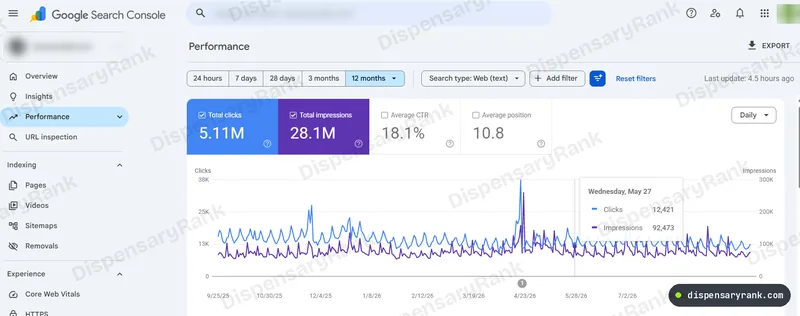 5.11M
clicks in twelve months across a multi-state chain
Multi-State Dispensary Chain
Read the case
5.11M
clicks in twelve months across a multi-state chain
Multi-State Dispensary Chain
Read the case
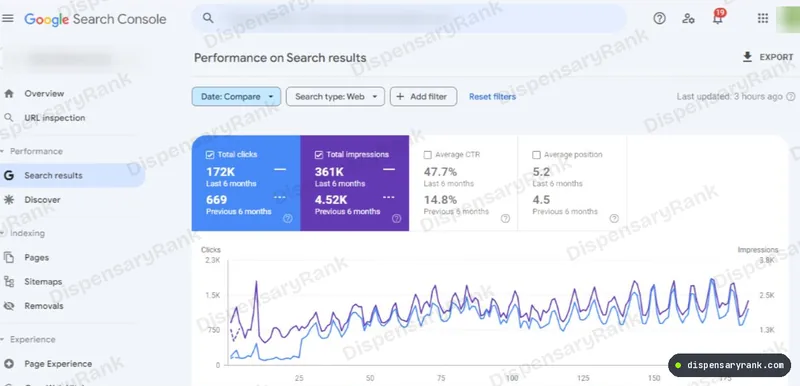 172K
clicks in six months, against 669 the six before
Michigan Dispensary
Read the case
172K
clicks in six months, against 669 the six before
Michigan Dispensary
Read the case
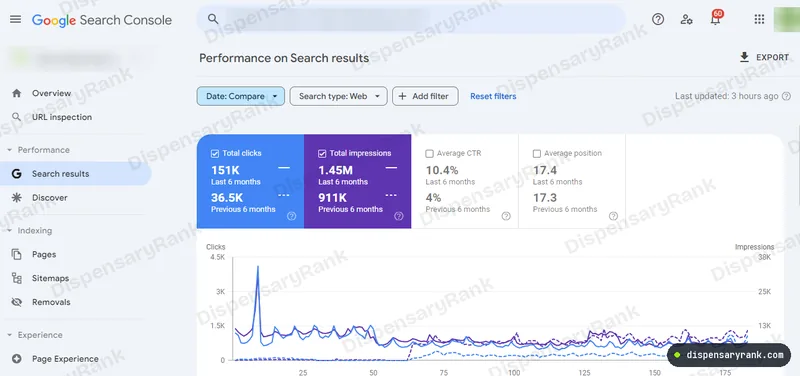 151K
clicks in six months, against 36.5K the six before
Michigan Dispensary Chain
Read the case
151K
clicks in six months, against 36.5K the six before
Michigan Dispensary Chain
Read the case
Technical work is mostly done in one push and then kept clean. So it is priced that way: a fixed sprint, then an optional monthly plan that stops the problems coming back.
Technical SEO makes the site readable. The full package also decides what each page should rank for and writes it. If the site is sound and the content is thin, the full package is the better spend.
| What is included | Technical SEO only | Full package |
|---|---|---|
| Crawl, rendering and indexing audit | ||
| Fix list written as developer tickets | ||
| Fixes made on WordPress sites | ||
| Developer instructions for custom built sites | ||
| Redesign and migration protection | Custom plan | Quoted separately |
| Keyword mapping across the whole site | ||
| Page rebuilds and new content | ||
| Business Profile and local work | ||
| Starts at | $1,000 once | $600 a month |
The free check crawls your key pages, renders them as Google does, and tells you which problems are holding traffic back. You get it in writing, whether or not we work together.
Get Your Free Technical Check Or see every service and the pricing