
Cannibalization is unusual among SEO problems because it produces no error.
There is no notice in Search Console, no red status in a crawl, no drop dramatic enough to trigger an investigation. Two of your pages are competing for the same search, both are ranking somewhere, and the reports look fine. It survives for years on that basis.
The cost is real and it is invisible in the same way that a slow leak is invisible. You do not notice the water. You notice the bill.
What Actually Happens
When two pages target the same intent, everything that would have made one page strong is divided between them.
External links that would have pointed at one page point at two. Internal links from your blog and navigation split across both. Engagement signals split. And Google, given two candidates that look interchangeable, has to pick.
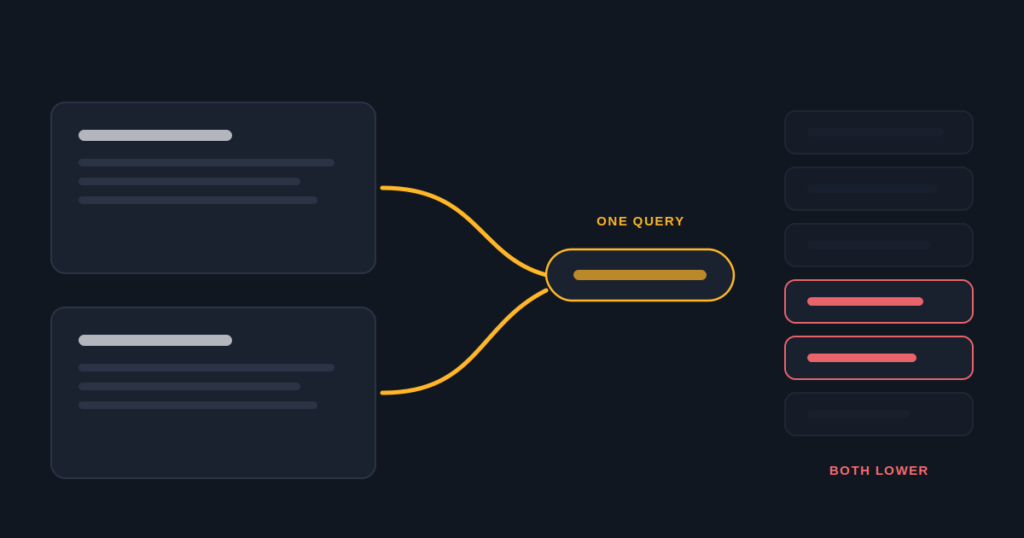
Three things can then happen, and all three are worse than having one page.
It picks the weaker page. Your Eugene store page has the better content and more links, but Google shows the Springfield page for “eugene dispensary” because of some signal you cannot see. You are ranking, badly, with the wrong page.
It alternates. The URL shown changes week to week. Neither page accumulates a stable history for the query, and both hover lower than they should.
It shows both, lower. Occasionally you get two results in positions eleven and fourteen where one page would have sat at six. This one feels like a win to anyone reading a rankings report, which is how it survives review.
Why Dispensary Chains Get This More Than Other Retailers
Three things stack up, and none of them are mistakes anyone made.
Licensing clusters your stores. Zoning and license caps push dispensaries into the same metros and often the same few districts. Two of your stores may be eleven minutes apart, both serving the same city, both with a legitimate claim to the city term.
Paid channels are closed, so location pages carry the entire acquisition load rather than supporting it. In an ordinary retail business, a weak location page is compensated for by paid search. Here there is nothing behind it.
The pages came off one template, which usually means they inherited the same title pattern and the same targeting. If the template said “{City} Dispensary | Brand”, every store got the same instruction. The shared skeleton takes a minute to confirm: paste your titles in and the words repeating across every store’s title stand out immediately.
That third point is the one to hold. Cannibalization on a chain is almost never eleven separate decisions. It is one decision, shipped eleven times. So the fix is a system rather than a rewrite, and it starts with one term per store, assigned before anybody writes.
How To See It In Search Console
1. Performance report, filter to one query you know several stores could rank for. Your city name plus dispensary is the usual candidate.
2. Switch the view from Queries to Pages with the filter still applied. More than one of your URLs appearing here means overlap exists.
3. Change the date view to compare week by week rather than looking at totals. Totals hide the pattern completely, which is why this goes unnoticed. You are looking for alternation: page A in weeks one, three and five, page B in weeks two, four and six.
4. Note the average position of each. If two pages alternate around position ten, a single consolidated page would very likely sit meaningfully higher. That difference is what the overlap costs.
The fourth step is the one that turns this from a curiosity into a business case. “Two pages are competing” is interesting. “Two pages are competing and one page would rank six positions higher” gets budget.
Map the whole chain at once
The cannibalization mapper takes your stores and the terms each targets, then shows which branches compete with each other, which stores have no term of their own, and which phrases nobody can own.
Run the keyword cannibalization mapper
The Ownership Model That Fixes It
One term, one owner. That is the whole principle, and the work is deciding rather than writing.
The city term goes to a hub, never to a store. If three stores serve Eugene, none of them owns “eugene dispensary”. Build a city page that covers the market, explains the differences between your locations, and links down to each. That page can win the city term without any of your stores fighting for it.
Each store owns something smaller. A neighborhood, a district, a landmark, an adjacent town it actually serves. Lower volume, higher intent, and impossible for your other stores to claim.
Near me belongs to the profiles. Why no page can rank for dispensary near me is its own subject. The short version: Google resolves it from the device, so a page cannot move the result, and eleven title tags chasing it just make your own pages compete.
Consolidate Or Differentiate
Once you know which pages overlap, there is exactly one question that decides what to do with each.
Does a customer need this page for anything other than ranking?
If yes, differentiate. A store page carries the address, the hours, the directions, and it is where your Business Profile sends people. Deleting it to solve a keyword problem creates a customer problem. Keep it and move it down a rung.
If no, consolidate. Old campaign landing pages, a second city page created during a promotion nobody remembers, a service page duplicating a location page. Merge anything useful into the survivor and 301 the rest.
The mistake here is applying one answer to everything. Teams either delete aggressively, losing pages customers actually use, or refuse to delete anything, leaving genuine duplicates in place because removing pages feels destructive.
On one chain, two stores eleven minutes apart had both been given the same city term as their primary target.
Neither ranked in the top ten. Both had been live for over a year.
After separating them onto their own neighborhoods, both entered the top five within a quarter, for terms with lower search volume and noticeably better conversion. The traffic was smaller and worth considerably more, because somebody searching a neighborhood already knows roughly where they are going.
That last sentence is the argument to use when somebody objects to targeting smaller terms. Volume on a term two of your stores are splitting is worth nothing to either of them.
Do not fix this by rewriting pages first.
Retrofitting targeting onto finished content usually means rewriting all of it, which is why remediation projects on this run long and get abandoned.
Map ownership on one sheet before anyone opens a page. An afternoon of deciding saves a month of writing.
The Stores With Nothing Assigned
There is a second finding that comes out of every ownership map, and it surprises people more than the overlap does.
Some stores have no term at all.
Not a term shared with another branch, no term. Nobody ever decided what that page was for, so it inherited whatever the template said, which is usually the city term everybody else is also chasing. So the store with no strategy ends up competing with the stores that have one.
When you build the sheet, add a column for “primary term” and fill it in for every location before you do anything else. The blanks are usually the fastest wins on the whole project, because a page with nothing to rank for has nowhere to go but up.
What To Do This Week
Open a spreadsheet. One row per store. Columns for the primary term that store owns alone, two or three secondary terms, and the neighborhoods its customers come from.
Fill it in before touching a page. Within twenty minutes two things become obvious: which stores are competing with each other, and which stores have nothing assigned.
Then work through the overlaps with the one question above. Store pages get differentiated. Everything else gets consolidated.
The page changes that follow are simple. The sheet is the actual work, and it is the part that gets skipped because it does not look like progress.
Keyword ownership is the quiet foundation of SEO for dispensary chains. Most chains skip it until two of their own stores start trading places.
If you would rather hand over the sheet and the rewrites, that is what our dispensary on-page SEO work covers.
If you take one thing away
Two pages on the same rung of the intent ladder is the problem. Decide ownership on a sheet before anyone writes a word.