
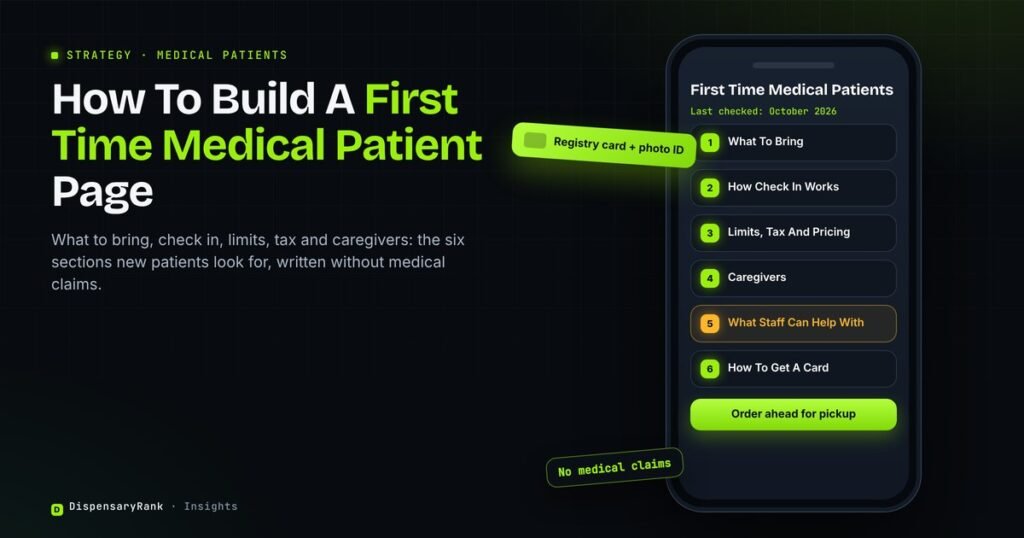
A first time medical patient has a short list of questions before the first visit. What do I bring? Does my card work here? Is there a separate line? Most dispensary websites answer these across five pages, or not at all.
A first time medical patient page puts every answer in one place. It helps patients arrive prepared, and it gives Google a clear page to show for first visit searches from medical marijuana patients.
This article covers what first time patients search for, the sections the page needs, how to write it without making medical claims, and how to keep it current.
Key points
- First time medical patients search for practical answers: what to bring, how check in works, limits, tax and caregivers.
- Answer each question in its own section, using the words patients search with.
- Never link a product to a condition, and never promise that someone will qualify for a card.
- Date the page, link to your state’s official program and review it whenever the rules change.
Why First Time Medical Patients Need Their Own Page
A new patient is not browsing the menu yet. They want to know if the visit will go smoothly. A general medical page or a FAQ buried in the footer rarely answers that well enough to rank or to help.
Medical cannabis is a health topic, and Google’s guidance on helpful content says it gives more weight to trust and accuracy on topics that affect health. A clear, dated, sourced page fits that standard better than scattered answers.
This page is one part of a larger medical section. Our guide on medical and adult use search markets explains how the medical hub and its supporting pages fit together.
What First Time Medical Patients Search For
The searches fall into a few groups. Each group should map to one section of the page, so a patient who lands from any of them finds the answer quickly.
| Question group | Example searches | Section that answers it |
|---|---|---|
| What to bring | “what do I need for my first dispensary visit”, “do I need my medical card at the dispensary” | What To Bring |
| How the visit works | “first time at a medical dispensary”, “medical patient check in” | How Check In Works |
| Limits and price | “medical marijuana purchase limit”, “medical card benefits” | Limits, Tax And Pricing |
| Caregivers | “can a caregiver pick up for a patient” | Caregivers |
| Getting a card | “how to get a medical marijuana card” | How To Get A Card |
Searches for “how to get a medical marijuana card” are usually led by state program sites and card clinics. Your page does not need to outrank them. It needs a short section that links to the official program and explains what happens once the card arrives.
The Sections Every First Visit Page Needs
Keep the sections in the order a patient needs them, from the night before the visit to the moment they leave. Each section should be short and answer one question.
First Time Medical Patients
Last checked: October 2026What To Bring
List the documents your state requires. In Michigan, patients must show a valid registry identification card at the time of purchase. Add a government photo ID if your store requires one, and say whether you accept digital cards.
How Check In Works
Explain what happens at the door, step by step. Say where patients check in, whether there is a separate medical line, how long the first registration usually takes and whether patients can order ahead for pickup.
Limits, Tax And Pricing
Medical patients often have different purchase limits and taxes than adult use customers. In Michigan, the 24% wholesale marijuana tax that started in January 2026 does not apply to medical marijuana. State the current figures for your state and the date you checked them.
Caregivers
Many states let a registered caregiver buy for a patient. Explain what a caregiver must bring, whether the patient must be present and how your store handles caregiver orders. Link to the state rules rather than restating them in full.
What Our Staff Can And Cannot Help With
Tell patients that staff can explain products, formats and how to read a label. Make clear that staff do not give medical advice and that questions about conditions or dosing belong with the patient’s doctor.
How To Get A Card
Keep this section short. Link to your state’s official medical program, explain renewal in one or two sentences and say what to do if a card has expired. Do not promise approval or suggest who qualifies.
Writing The Page Without Breaking The Rules
A medical patient page is the easiest place on a dispensary site to make a claim you cannot support. The safest rule is to describe the visit, the process and the store, and leave health outcomes out.
Our cannabis advertising compliance guide covers the restrictions most states share. You can also run the page copy through our cannabis compliance checker before it goes live. This is not legal advice, so have your compliance lead approve the final text.
The title tag needs the same care. “First Time Medical Patients | Store Name, City” works. A title that promises relief or names a condition does not. Our post on title tags that are not advertising has more examples.
FAQ Sections And Rich Results
A FAQ section is still useful on this page, because patients scan for their question. Do not expect FAQ rich results from it. Since 2023, Google shows FAQ rich results only for well known government and health sites.
Write each FAQ answer in two or three sentences, using the patient’s own wording in the question. Good questions come from the counter staff, who hear them every day.
Keeping The Page Current
Medical program rules change. Taxes, limits, card formats and caregiver rules can all move within a year. An outdated limit or tax figure on this page can cause a problem at the counter.
Show a “last checked” date near the top of the page. Review the page every quarter, and again whenever your state announces a change. Tell counter staff what changed, so the page and the counter give the same answer.
Keeping patient pages current is part of how we handle SEO for medical dispensaries, alongside the claim review every page gets.
Frequently Asked Questions
What Should A First Time Medical Patient Page Include?
What to bring, how check in works, purchase limits and tax, caregiver rules, what staff can help with and a link to the state’s official medical program. Add a “last checked” date and a short FAQ.
Should The Medical Patient Page Be Separate From The Adult Use Page?
Yes. First time medical patients search for different things than adult use customers. A separate page answers those questions directly and avoids two pages competing for the same searches.
Can A Dispensary Explain Which Products Help With A Condition?
No. Linking a product to a condition is a health claim, and many states restrict it. Describe products, formats and labels, and refer condition questions to the patient’s doctor.
How Often Should The Page Be Updated?
Every quarter, and whenever your state changes taxes, limits or card rules. Update the “last checked” date each time, even when nothing changed.
What To Do First
Ask your counter staff for the ten questions new patients ask most. Group them using the table above, write one short section for each and add your state’s current limits with the date you checked them.
Patient pages are one part of how we approach cannabis SEO for dispensaries: every page answers a real question, and every claim stays inside your state rules.
Free audit
Our free audit reviews your medical pages for missing sections, compliance risks and pages competing with each other, and lists what to fix.